How to test our APIs?
The documentation that follows describes how the APIs can be tested with examples from the Sandbox environment where you can register for free to experiment and test our APIs. Once you finish your implementation you can switch to the production environment by changing the base URL of the examples. The URLs are listed below:
PSD2 Providers:
https://apis-secure.bankofcyprus.com/df-boc-org-prd/prod/psd2/v2
B2B Customers:
https://apis.bankofcyprus.com/df-boc-org-prd/prod/psd2
TEST SUBSCRIPTION APIS
The following steps are needed to test the BoC APIs for the creation of subscriptions. Samples are provided based on the Swagger file provided in the portal and on testing scripts in Postman.
Below you can find the link to a test suite with the steps required to test the Subscription APIs. It includes HTTP requests with sample headers, test data and environment variables.
Postman is a free REST test tool; you can download the tool from here:https://www.getpostman.com/
Save the content of the link, extract the folder to get the JSON files and then import them in the tool as a test collection.
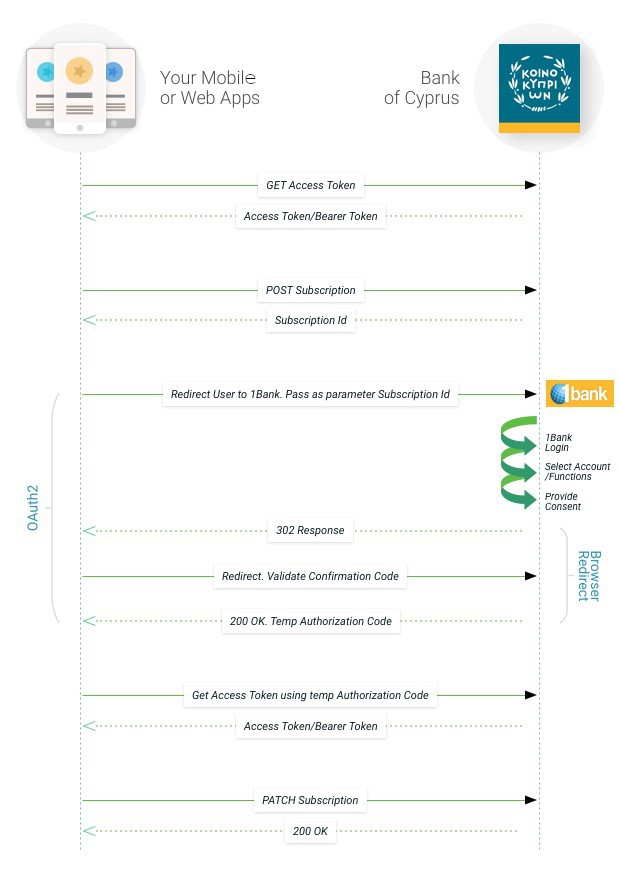
The rest of this document explains the steps implemented in the test suite. You can use this information as guidance for the logic you need to implement in your application to be able to create a subscription ID.
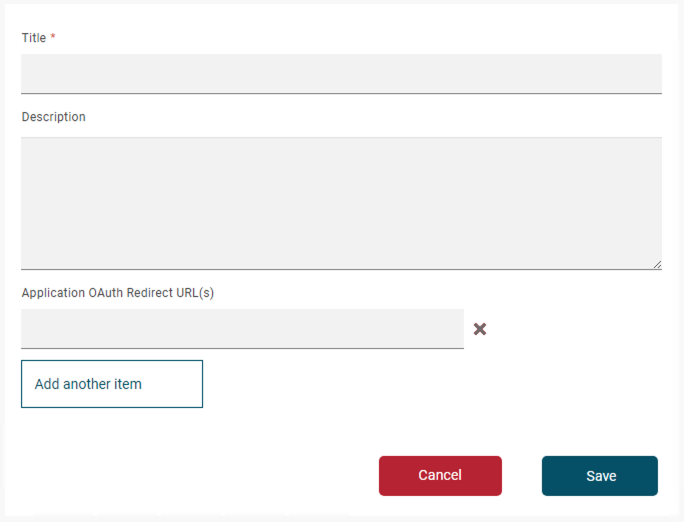
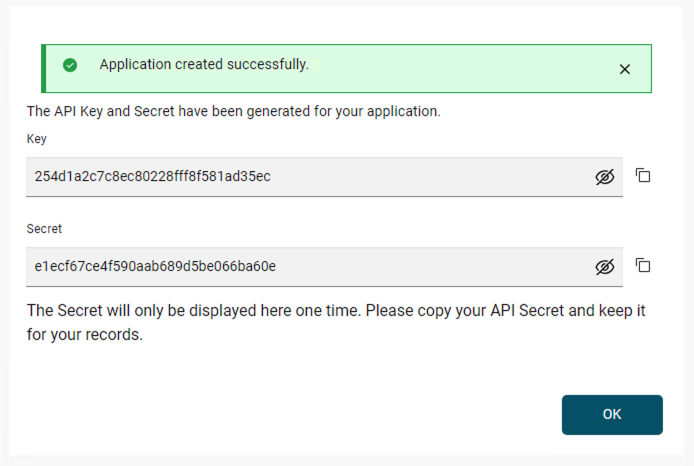
Before calling any of the APIs, you must ensure that you follow the 'Create Subscription' process on How to access and call our APIs section.
Steps for initiating and activating a subscription
1. Obtain an access token to invoke the Subscription API:
In this step you use the TPP credentials to obtain the access token required to submit in each API call.
Call the POST /oauth2/token endpoint in the tppoauth2security API. The following parameters must be passed as headers in the HTTP request (Mandatory fields highlighted in Red).
Example Request
curl --request POST \ --url https://sandbox-apis.bankofcyprus.com/df-boc-org-sb/sb/psd2/oauth2/token \
--header accept: application/json \
--header content-type: application/x-www-form-urlencoded \
--data grant_type=client_credentials&client_id={{your client id}}&client_secret={{your client secret}}&scope=TPPOAuth2Security
Example Response
{
"token_type": "bearer",
"access_token": "6334262361656275",
"expires_in": 3600,
"consented_on": 1542264419,
"scope": "TPPOAuth2Security",
}
The access token received will be used in all the API calls.
2. Obtain a Subscription Id
The subscription Id will be used in all the API calls. The Subscription ID must be authorized to be used. For the POST subscription API, you will need the Authorization Token from the previous call.
Example Request
curl --request POST \ --url https://sandbox-apis.bankofcyprus.com/df-boc-org-sb/sb/psd2/v1/subscriptions \
--header Authorization: Bearer {{oauth_token}} \
--header Content-Type: application/json \
--header timeStamp: {{$timestamp}} \
--header journeyId: {{$guid}} \
--header Content-Type: application/json \
--data {
"accounts": {
"transactionHistory": true,
"balance": true,
"details": true,
"checkFundsAvailability": true
},
"payments": {
"limit": 99999999,
"currency": "EUR",
"amount": 999999999
}
}
Example Response
{
"duration": {
"startDate": "20/11/2017",
"endDate": "20/11/2018"
},
"subscriptionId": "Subid000001-1590333432791",
"status": "PENDING",
"description": "SUBSCRIPTION",
"selectedAccounts": [],
"accounts": {
"transactionHistory": true,
"balance": true,
"details": true "checkFundsAvailability": true
},
"payments": {
"limit": 99999999,
"currency": "EUR",
"amount": 999999999
}
}
3. Select Accounts for the Subscription Id
After initiating the subscription, the user needs to select the accounts to be used with this subscription and provide a consent. This can be done by redirecting the user to the below URL:
Example Request in Browser
https://sandbox-apis.bankofcyprus.com/df-boc-org-sb/sb/psd2/oauth2/authorize?response_type=code&redirect_uri={{yourAppRedirectionURL}}&scope=UserOAuth2Security&client_id={{yourClientId}}&subscriptionid={{subscriptionId}}
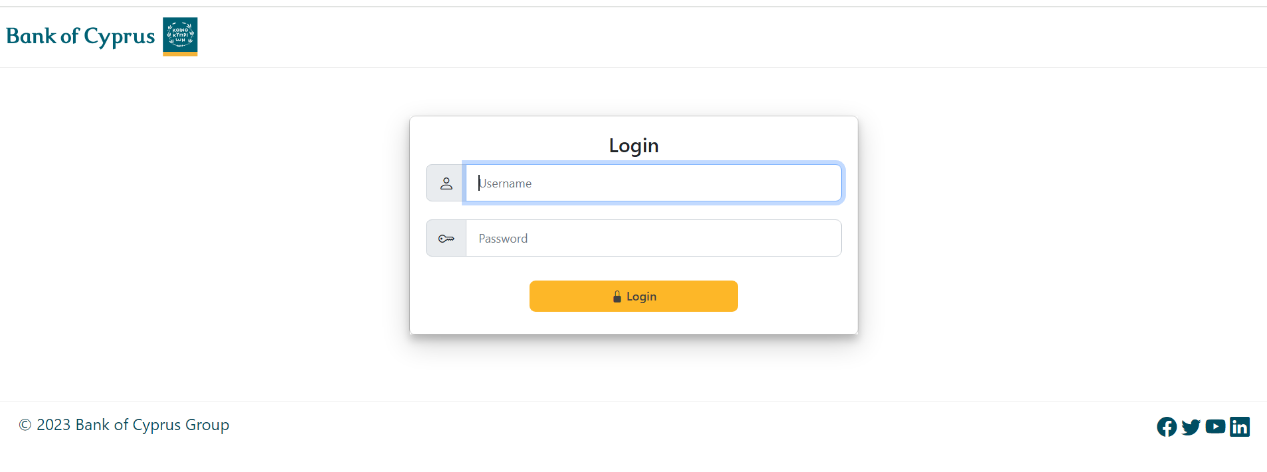
After entering the username=999999 and passcode=112233 we get the following screen.
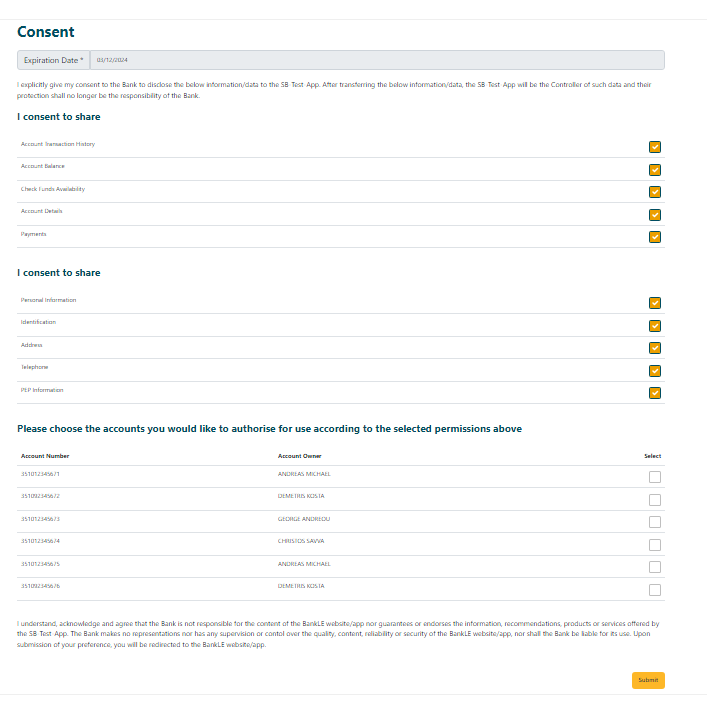
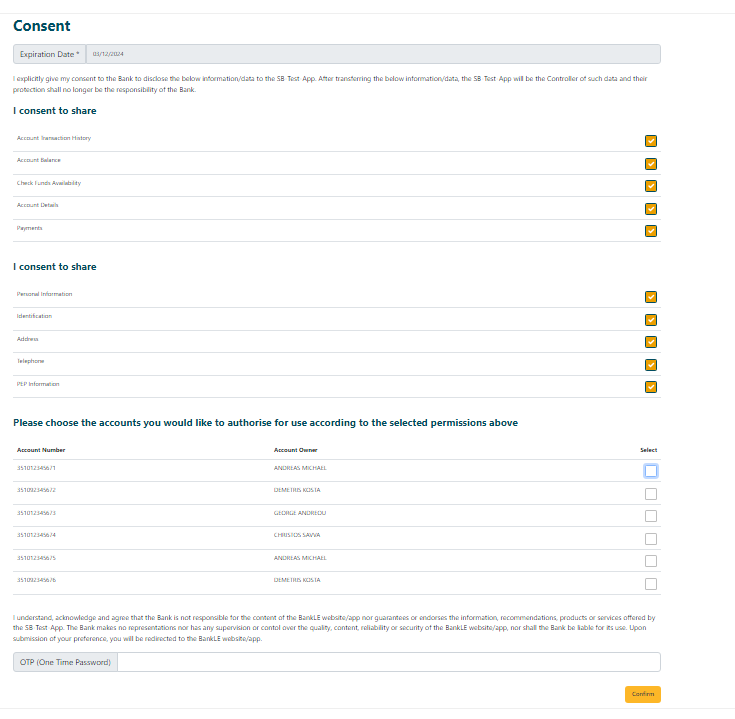
After you select the accounts and provide your consent the user will be redirected back to your app’s redirect URL with the authorization code as a query parameter.
Example Response
https://localhost/?code=AAIB7CW9gOFNa6c3B5l9GsfSHT
4. Get second Access token for the update of subscription
Example Request
curl --request POST \ --url https://sandbox-apis.bankofcyprus.com/df-boc-org-sb/sb/psd2/oauth2/token \
--header accept: application/json \
--header content-type: application/x-www-form-urlencoded \
--data grant_type=authorization_code&client_id={{yourClientId}}&client_secret={(yourClientSecret}}&code= {{code from redirect}}&scope=UserOAuth2Security
Example Response
{
"token_type": "bearer",
"access_token": "6334262361656275",
"expires_in": 3600,
"consented_on": 1542264419,
"scope": "UserOAuth2Security",
}
The access token will be used for the authorization of the Subscription Id below.
5. Update Subscription Id
The last step is the activation of the subscription which is done by calling PATCH Subscription. Before calling it, get the details of the subscription including the accounts as accepted by the user by calling the GET Subscription API and use the details when calling the PATCH API.
Example GET Subscription Request:
curl --location --request GET "https://sandbox-apis.bankofcyprus.com/df-boc-org-sb/sb/psd2/v1/subscriptions/{{subscriptionId}}" \
--header "Authorization: Bearer {{oauth_code}}"\
--header "Content-Type: application/json" \
--header "journeyid: {{$guid}}" \
--header "timestamp: {{$timestamp}}" \
GET Subscription Sample Response:
{
"SubscriptionId": "Subid000001-1725429256148",
"status": "PENDING",
"description": "SUBSCRIPTION",
"accounts": {
"transactionHistory": true,
"balance": true,
"details": true,
"checkFundsAvailability": true
},
"payments": {
"limit": 50,
"currency": "string",
"amount": 50
},
"expirationDate": "03/12/2024"
}
Example PATCH Subscription Request:
curl –-location --request PATCH
‘https://sandbox-apis.bankofcyprus.com/df-boc-org-sb/sb/psd2/v1/subscriptions/{{subscriptionId}}’ \
--header ‘authorization: Bearer {{oauth_code}}’ \
--header ‘content-type: application/json’ \
--header ‘journeyId: {{$guid}}’ \
--header ‘timestamp: {{$timestamp}}’ \
--data '{
"subscriptionId": "Subid000001-1725429256148",
"status": "INPROGRESS",
"description": "SUBSCRIPTION",
"selectedAccounts": [
{
"accountId": "351012345671"
},
{
"accountId": "351092345672"
},
{
"accountId": "351012345673"
},
{
"accountId": "351012345674"
},
{
"accountId": "351012345675"
},
{
"accountId": "351092345676"
}
],
"accounts": {
"transactionHistory": true,
"balance": true,
"details": true,
"checkFundsAvailability": true
},
"payments": {
"limit": 50,
"currency": "string",
"amount": 50
},
"expirationDate": "16/01/2025"
}'
Example PATCH Subscription Response:
{
"subscriptionId": "Subid000001-1725429256148",
"status": "ACTV",
"description": "SUBSCRIPTION",
"selectedAccounts": [
{
"accountId": "351012345671"
},
{
"accountId": "351092345672"
},
{
"accountId": "351012345673"
},
{
"accountId": "351012345674"
},
{
"accountId": "351012345675"
},
{
"accountId": "351092345676"
}
],
"accounts": {
"transactionHistory": true,
"balance": true,
"details": true,
"checkFundsAvailability": true
},
"payments": {
"limit": 50,
"currency": "string",
"amount": 50
},
"duration": {
"startDate": "04/09/2024",
"endDate": "03/12/2024"
}
}
The Subscription is now ACTIVE to be used for all the other APIs (Accounts and B2B Payments).
TESTING ACCOUNT APIS
The following steps are needed to test the BoC APIs for the different actions on customer accounts. Samples are provided based on the Swagger file provided in the portal and on testing scripts in Postman.
Below you can find the link to a test suite with the steps required to test the following actions, it includes HTTP requests with sample headers and test data.
1. Get Accounts for specific subscription IDs
2. Get Accounts Details
3. Get Available Balance API
4. Get Account Statement API
1. Get Accounts for specific subscription IDs
Example Request
curl --location --request GET "https://sandbox-apis.bankofcyprus.com/df-boc-org-sb/sb/psd2/v1/accounts" \
--header "Content-Type: application/json" \
--header "Authorization: Bearer {{oauth_code}}"\
--header "subscriptionId: {{subscription_id}}" \
--header 'journeyId: {{uuid}}' \
--header "timestamp: {{$timestamp}}" \
Example Response
[
{
"bankId": "12345671",
"accountId": "351012345671",
"accountAlias": "ANDREAS",
"accountType": "CURRENT",
"accountName": "ANDREAS MICHAEL",
"IBAN": "CY11002003510000000012345671",
"currency": "EUR",
"infoTimeStamp": "1511779237",
"interestRate": 0,
"maturityDate": "19/11/2018",
"lastPaymentDate": "19/11/2017",
"nextPaymentDate": "19/12/2017",
"remainingInstallments": 10,
"balances": []
}
]
2. Get Accounts Details
This API will retrieve the information for specific accounts.
Example Request
curl --location --request GET "https://sandbox-apis.bankofcyprus.com/df-boc-org-sb/sb/psd2/v1/accounts/{{account_number}}’ \
--header "Content-Type: application/json" \
--header "Authorization: Bearer {{oauth_code}}” \
--header "subscriptionId: {{subscription_id}}" \
--header 'journeyId: {{uuid}}' \
--header "timestamp: {{$timestamp}}" \
Example Response
[
{
"bankId": "12345671",
"accountId": "351012345671",
"accountAlias": "ANDREAS",
"accountType": "CURRENT",
"accountName": "ANDREAS MICHAEL",
"IBAN": "CY11002003510000000012345671",
"currency": "EUR",
"infoTimeStamp": "1511779237",
"interestRate": 0,
"maturityDate": "19/11/2018",
"lastPaymentDate": "19/11/2017",
"nextPaymentDate": "19/12/2017",
"remainingInstallments": 10,
"balances": [
{
"amount": 1000,
"balanceType": "AVAILABLE"
},
{
"amount": 1000,
"balanceType": "CURRENT"
}
]
}
]
3. Get Available Balance API
The GetBalance API uses the same headers as AccountDetails API.
Example Request
curl --location --request GET "https://sandbox-apis.bankofcyprus.com/df-boc-org-sb/sb/psd2/v1/accounts/{{account_number}}/balance" \
--header "Content-Type: application/json" \
--header "Authorization: Bearer {{oauth_code}}"\
--header "subscriptionId: {{subscription_id}}" \
--header 'journeyId: {{uuid}}' \
--header "timestamp: {{$timestamp}}" \
Example Response
[
{
"bankId": "12345671",
"accountId": "351012345671",
"accountAlias": "ANDREAS",
"accountType": "CURRENT",
"accountName": "ANDREAS MICHAEL",
"IBAN": "CY11002003510000000012345671",
"currency": "EUR",
"infoTimeStamp": "1511779237",
"interestRate": 0,
"maturityDate": "19/11/2018",
"lastPaymentDate": "19/11/2017",
"nextPaymentDate": "19/12/2017",
"remainingInstallments": 10,
"balances": [
{
"amount": 1000,
"balanceType": "AVAILABLE"
},
{
"amount": 1000,
"balanceType": "CURRENT"
}
]
}
]
4. Get Account Statement API
The GetAccStatement API retrieves the transactions of an account:
Example Request
curl --location --request GET "https://sandbox-apis.bankofcyprus.com/df-boc-org-sb/sb/psd2/v1/accounts/{{account_number}}/statement?startDate=16/04/2024&endDate=16/05/2024&maxCount=10"\
--header "Content-Type: application/json" \
--header "Authorization: Bearer {{oauth_code}}"\
--header "subscriptionId: {{subscription_id}}" \
--header 'journeyId: {{uuid}}' \
--header "timestamp: {{$timestamp}}" \
Example Response
{
"account": {
"bankId": "12345671",
"accountId": "351012345671",
"accountAlias": "ANDREAS",
"accountType": "CURRENT",
"accountName": "ANDREAS MICHAEL",
"IBAN": "CY11002003510000000012345671",
"currency": "EUR",
"infoTimeStamp": "1511779237"
},
"transaction": [
{
"id": "663c9d26de9162079842ce59",
"dcInd": "DEBIT",
"transactionAmount": {
"amount": 30,
"currency": "EUR"
},
"description": "SWIFT Transfer",
"postingDate": "09/05/2024",
"valueDate": "09/05/2024",
"transactionType": "PAYMENT"
},
{
"id": "664307a7de9162079842cef8",
"transactionAmount": {
"amount": 10,
"currency": "EUR"
},
"postingDate": "14/05/2024",
"valueDate": "14/05/2024"
},
{
"id": "6644a7c9d983f403982a0b1e",
"transactionAmount": {
"amount": 10,
"currency": "EUR"
},
"postingDate": "15/05/2024",
"valueDate": "15/05/2024"
}
]
}
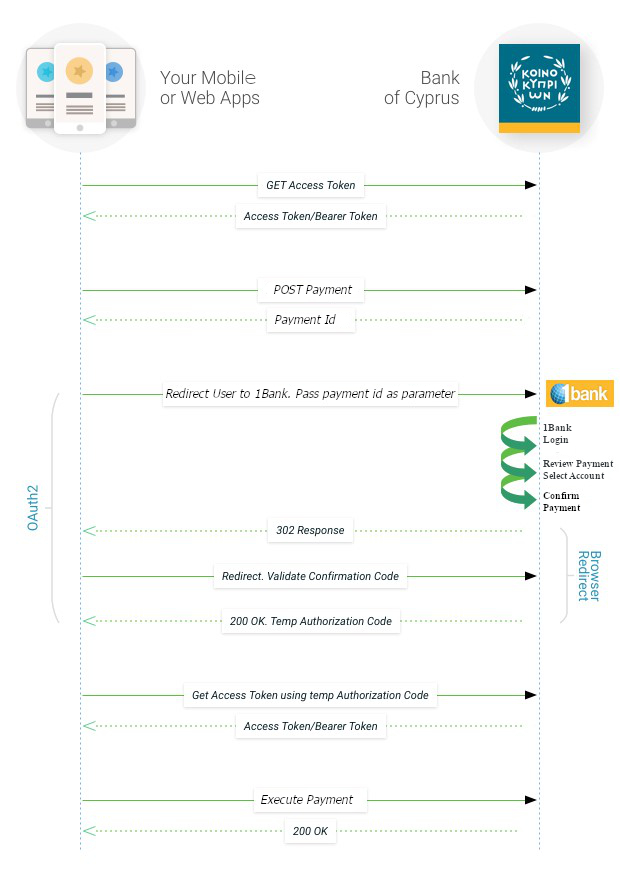
TESTING PAYMENTS APIs
The following steps are needed to test BoC APIs for the creation of a payment.
1. Sign Request (JWS_Sign_Verify API)
When creating a payment, the payload must be signed with a Digital Certificate. To simplify this step in Sandbox an API to sign the payment payload had been provided. In the actual production environment this step must be done by the app and this API is not available.
Example Request
curl="" post="">https://sandbox-apis.bankofcyprus.com/df-boc-org-sb/sb/jwssignverifyapi/sign" \
--header "Content-Type: application/json" \
--header 'tppId: singpaymentdata' \
--data-raw "{
"debtor": {
"bankId": "",
"accountId": "351012345671"
},
"creditor": {
"bankId": "CITIUS33",
"accountId": "48193222324233"
},
"transactionAmount": {
"amount": 30,
"currency": "EUR"
},
"paymentDetails": "SWIFT Transfer"
}"
Example Response
{
"payload": "eyAiZGVidG9yIjp7ICJiYW5rSWQiOiIiLCAiYWNjb3VudElkIjoiMzUxMDEyMzQ1NjcxIiB9LCAiY3JlZGl0b3IiOnsgImJhbmtJZCI6IkNJVElVUzMzIiwgImFjY291bnRJZCI6IjQ4MTkzMjIyMzI0MjMzIiB9LCAidHJhbnNhY3Rpb25BbW91bnQiOnsgImFtb3VudCI6MzAsICJjdXJyZW5jeSI6IkVVUiIgfSwgInBheW1lbnREZXRhaWxzIjoiU1dJRlQgVHJhbnNmZXIiIH0",
"signatures": [
{
"protected": "eyJhbGciOiJSUzI1NiJ9",
"signature": "s9vy53hGobNDeuQGyQI1J4-Kopo7AsVPMNYuyku9PLV2UXSAzkEfPQQPHYsAHe4ZnArv06XDp2Qsnqti5v88IWIDQe1AlVmNLEiVmkIBwXjsSWcRaNqVPWVas70SuO6ddrqH1Vz_UbvBJD02e49iDhuuCnsKZYBU7jvo4o-JvHyWXneXFElQvXKSCA-iddaivXdKWEuv7R2pkDr3xOJKJ4xS8Ugt5vKUVWMVQhDK6fOfzh50VeCSxC0v-XByMC4wLZcb4HbPtH9YEtP0MqF_AkqFRGD8v5OBBYr6pQdQ7oBRe1N6a9UkAhG0UDrfZFPoD6m1Gbdd9__RspWOU7fMDA"
}
]
}
In case you want to test the JWS signing in the Sandbox Environment you can use the below key which is the same used by the “Sign Request” API.


The JWS signature string will be provided on the body of the API call to initiate the payment.
Example Request
curl --location --request POST "https://sandbox-apis.bankofcyprus.com/df-boc-org-sb/sb/psd2/v1/payments/initiate’\
--header "Content-Type: application/json" \
--header "Authorization: Bearer {{oauth_code}}”\
--header 'journeyId: {{uuid}}' \
--header ‘timestamp: {{$timestamp}}’ \
--header 'customerDevice: {{yourDevice}}' \
--header 'customerIP: 10.0.0.0' \
--header 'customerSessionId: 1232545908' \
--header 'loginTimeStamp: {{$timestamp}}' \
--data-raw "{
"payload": "eyAiZGVidG9yIjp7ICJiYW5rSWQiOiIiLCAiYWNjb3VudElkIjoiMzUxMDEyMzQ1NjcxIiB9LCAiY3JlZGl0b3IiOnsgImJhbmtJZCI6IkNJVElVUzMzIiwgImFjY291bnRJZCI6IjQ4MTkzMjIyMzI0MjMzIiB9LCAidHJhbnNhY3Rpb25BbW91bnQiOnsgImFtb3VudCI6MzAsICJjdXJyZW5jeSI6IkVVUiIgfSwgInBheW1lbnREZXRhaWxzIjoiU1dJRlQgVHJhbnNmZXIiIH0",
"signatures": [
{
"protected": "eyJhbGciOiJSUzI1NiJ9",
"signature": "s9vy53hGobNDeuQGyQI1J4-Kopo7AsVPMNYuyku9PLV2UXSAzkEfPQQPHYsAHe4ZnArv06XDp2Qsnqti5v88IWIDQe1AlVmNLEiVmkIBwXjsSWcRaNqVPWVas70SuO6ddrqH1Vz_UbvBJD02e49iDhuuCnsKZYBU7jvo4o-JvHyWXneXFElQvXKSCA-iddaivXdKWEuv7R2pkDr3xOJKJ4xS8Ugt5vKUVWMVQhDK6fOfzh50VeCSxC0v-XByMC4wLZcb4HbPtH9YEtP0MqF_AkqFRGD8v5OBBYr6pQdQ7oBRe1N6a9UkAhG0UDrfZFPoD6m1Gbdd9__RspWOU7fMDA"
}
]
}"
Example Response
{
"authCodeNeeded": true,
"payment": {
"paymentId": "1ccec876-2440-48d7-9751-7ea57935335e",
"charges": [
{
"name": "Transfer_charges",
"value": "10"
}
]
}
}
3. Review the payment and Select Account
After initiating the payment, the user needs to review the payment, select the debit account to be used if needed with this subscription and provide a consent. This can be done by redirecting the user to the below URL:
https://sandbox-apis.bankofcyprus.com/df-boc-org-sb/sb/psd2/oauth2/authorize?response_type=code&redirect_uri={{yourAppRedirectionURL}}&scope=UserOAuth2Security&client_id={{yourClientId}}&paymentid={{PaymentId}}
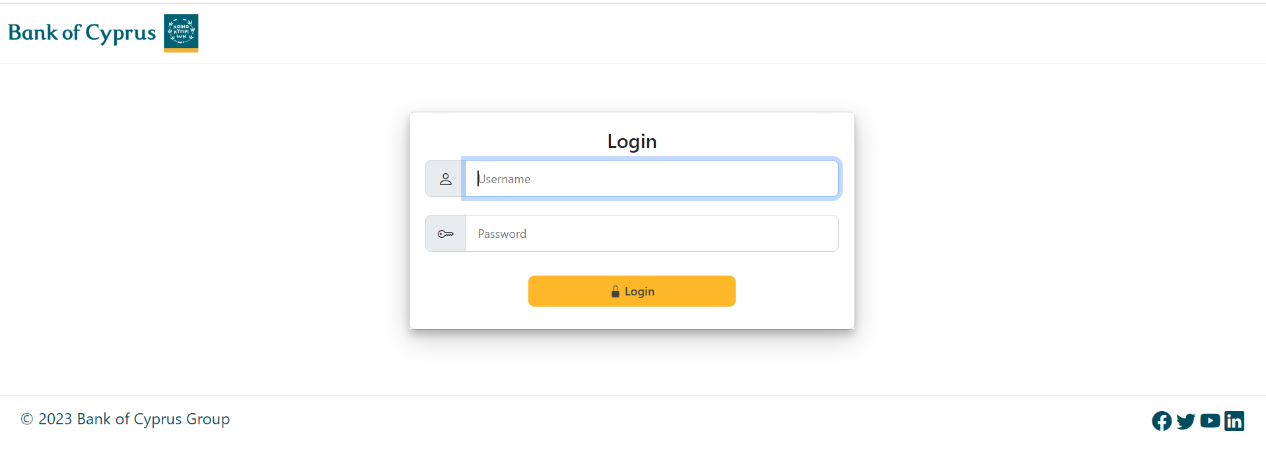
After entering the username=999999 and passcode=112233 we get the following screen.
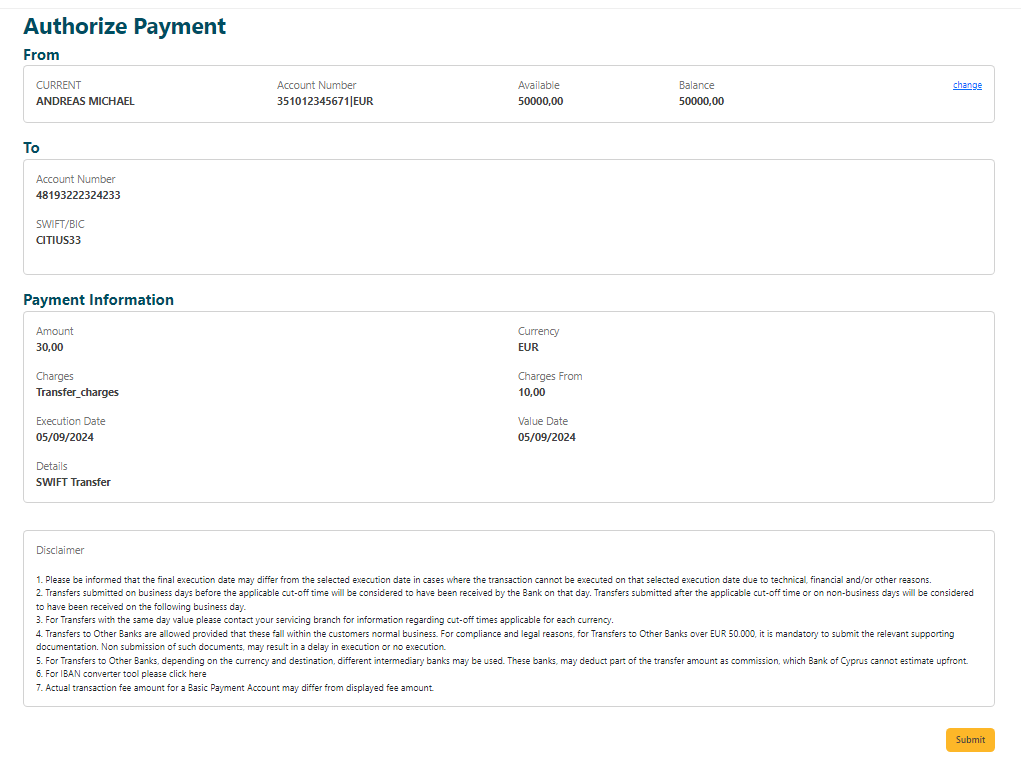
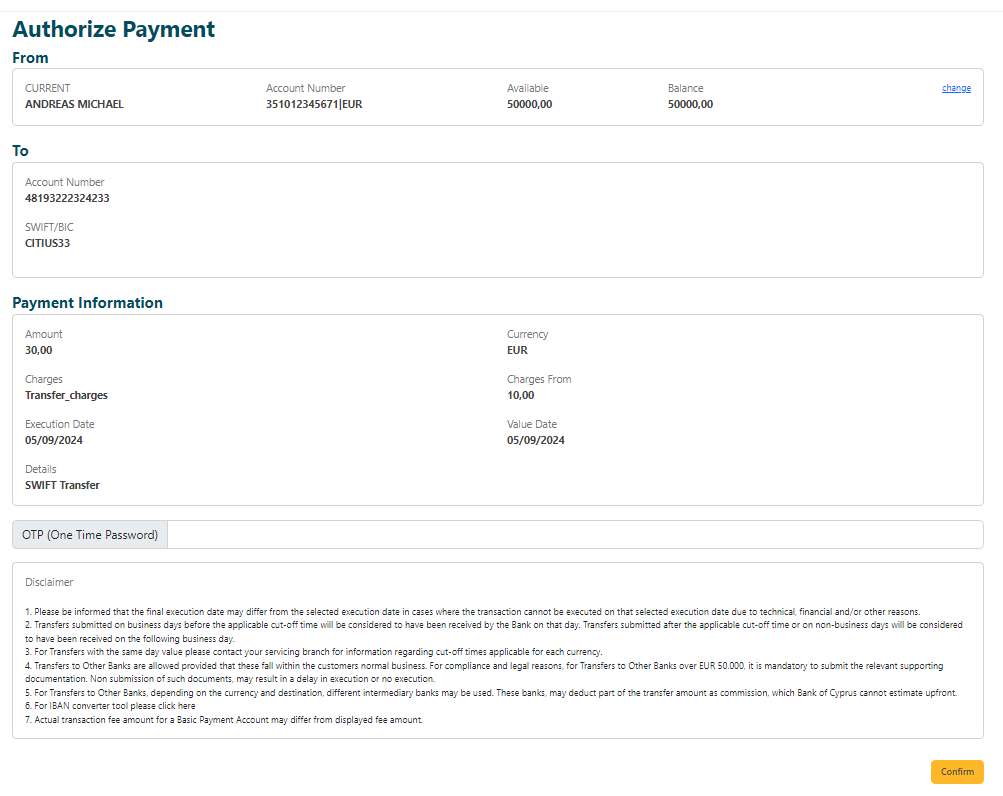
After you review the payment and provide your consent the user will be redirected back to your app’s redirect URL with the authorization code as a query parameter as seen below.
Example Response
https://localhost/?code= AAIB7CW9gOFNa6c3B5l9GsfSHT
4. Get second Access token for the PATCH subscription
Example Request
curl –-location --request POST https://sandbox-apis.bankofcyprus.com/df-boc-org-sb/sb/psd2/oauth2/token \
--header accept: application/json \
--header content-type: application/x-www-form-urlencoded \
--data grant_type=authorization_code&client_id={{client_id}}&client_secret={(client_secret}}&code={{code_from_redirect}}&scope=UserOAuth2Security
Example Response
{
"token_type": "bearer",
"access_token": "6334262361656275",
"expires_in": 3600,
"consented_on": 1542264419,
"scope": "UserOAuth2Security",
}
5. Execute the payment
The access token will be used to execute the payment and complete the flow.
Example Request
curl --location --request POST "https://sandbox-apis.bankofcyprus.com/df-boc-org-sb/sb/psd2/v1/payments/{{paymentId}}/execute’ \
--header "Content-Type: application/json" \
--header "Authorization: Bearer {{oauth_code}}\
--header 'journeyId: {{uuid}}' \
--header ‘timestamp: {{$timestamp}}’
Example Response
{
"code": "CPLT",
"description": [
"The transaction has passed all validations and was successfully posted in bank systems"
],
"refNumber": "12345678"
}
The transaction has status CPLT.